Building Eventflow

Background
I recently overheard someone say their dream superpower was universal empathy and communication or in other words, the ability to truly connect with anyone. That superpower already exists— it’s listening.
Stay quiet, pay attention, and genuinely care about what the other person is saying.
Okay, sure I might’ve glossed over the language barrier part, but that’s not the point of this post. In the context of building product, truly listening reveals user pain points, repeated frustrations, workarounds, and unmet needs. These signals aren’t always obvious at first, but with time and attention, they become clear. And once they do, they often point directly to what needs to be built.
Take something as simple as a group photo at a party. Not everyone knows each other; someone brought a plus-one, or another just met the group. The connections are temporary. Someone always says, "Make sure you send me that," but the photo stays buried in someone’s camera roll, never shared. Too much friction. That’s when I asked myself: “How do you remove this friction?”
That question led me to build Eventflow.
About
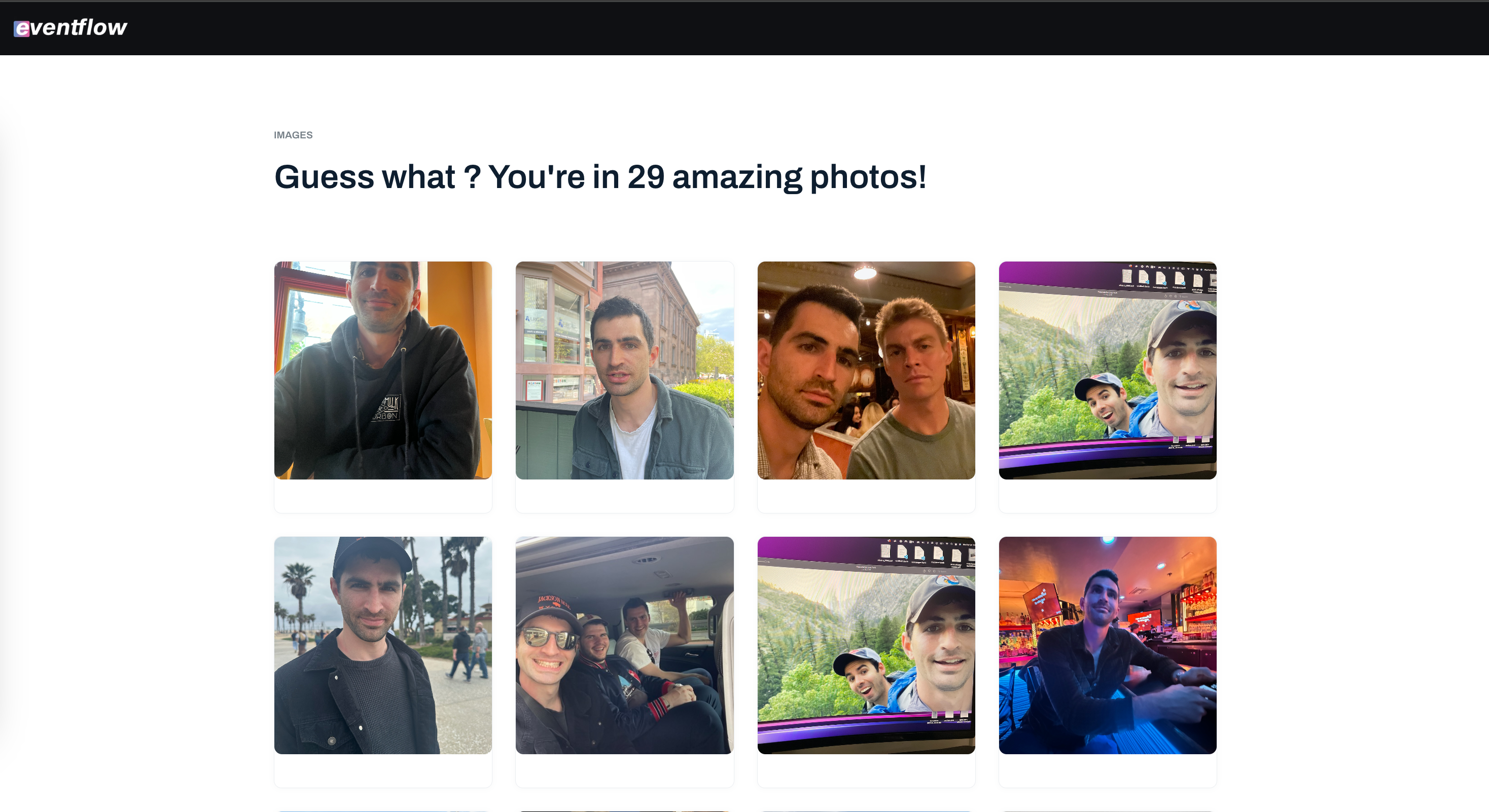
Eventflow breaks the silo and provides a seamless delivery of images to the people found in them. To keep it simple, a group organizer registers an event which in return creates a group phone number. Attendees register to the group with a phone number, email, and profile image. This profile photo is the attendees “fingerprint” that allows this whole system to work. Once verified, attendees can text in images to the group registered phone number. As attendees upload images, Eventflow scans incoming images matching faces in the image to the repository of verified user “fingerprints”. If an incoming image has the face of a registered user, that attendee will get a notification to a url of gallery of that image plus more as they stream in. That’s it.
System
The system was made up of the following business objects:
- Event: a gathering of people organized by an individual
- Organizer: responsible for creating the event
- Attendee: invited by organizers to join event(s)
- Gallery: a collection of media
- Media: shareable photograph or video
- Notifications: alert of change from the system
Eventflow revolves around two users: the group organizer and the attendee. The organizer needs a simple way to create a shareable event—one they can tie to a phone number and pass around. Both organizers and attendees should be able to register, text in photos, and get a notification when they appear in someone’s image, with a link to their own private gallery.
To make the experience feel as smooth and reliable as possible, I designed Eventflow around five core principles: availability, consistency, durability, scalability, and security. These weren’t just checkboxes—they were tradeoffs I had to weigh early and often. I leaned toward availability over strict consistency, because when someone is uploading photos or checking their gallery, they should always get something even if it’s not fully up to date. A delay of a few minutes is fine, as long as the system stays fast and responsive. So I embraced eventual consistency across components like image uploads, face indexing, notifications, and gallery viewing, while reserving strict consistency for key actions like event and user registration, where data integrity really matters.
People don’t want to lose their memories, so durability was heavily considered in this design. I built in automated backups, ensured match results were recoverable, and made sure galleries could be reconstructed even weeks later if needed.
Scalability followed naturally. Even small events generate a surprising amount of content. A 50-person party can lead to 600+ uploaded photos in just a few hours. With 8–12 faces per image, that adds up to 5,000 to 7,000 face detections, all of which need to be processed, matched, and routed in near real-time. At a mid-size conference with 300 attendees, the system might see over 10,000 images and 100,000 face detections in a single day, especially when photographers are involved. To stay ahead of that demand, I built Eventflow with autoscaling queues, parallel face detection pipelines, and infrastructure that could stretch under pressure and stay lean when idle. Every part of the system from upload to gallery delivery had to perform without the user ever noticing.
In early conversations, trust came up over and over again:
- “Can someone fake a profile and access my photos?”
- “What if I don’t want my face routed?”
- “Will my gallery be public?”
To address these concerns, OTP-based identity verification was integrated to prevent fake profiles, kept galleries private by default, and gave users full control with face-routing opt-outs. These safeguards were part of the foundation and shaped directly by user input. At weddings, for example, some guests specifically request photographers not to be photographed or have their images distributed. Eventflow can flag those faces so that any matches are automatically withheld. It’s all part of designing with trust in mind turning real concerns into built-in protections.
Relationships
| Gallery | Event | Media | Notification | Organizer | Attendee | |
|---|---|---|---|---|---|---|
| Gallery | Is linked to (same galleries in a group) | — | - Can have media - Can display and organize - Controls what is visible |
- Sent when gallery updates | - Managed by organizer - Created for group |
- Viewed by attendee - Personalized |
| Event | - Contains one - Controls permissions |
— | - Can have uploaded media - Context for events |
Can have group-wide notifications | Created by organizer | - Attendees are members - Can be invited |
| Media | - Part of one or many galleries | Submitted to event | — | - Sent on match - Sent on new uploads |
- Can upload - Can delete - Can moderate |
- Attendee may appear in photo - Can download photos |
| Notification | - Sent when gallery updates | Can be group-based | Triggers notification on face match | — | - Can trigger - Can customize messages |
- Sent to attendee - Receives for match - Receives for gallery update |
| Organizer | - Can manage - Can create |
Can create Can invite attendees |
- Can upload - Can delete - Can moderate |
Created by system or organizer | — | - Can see attendee activity - Can invite |
| Attendee | - Can view multiple - Receives matches |
- Can join - Can view multiple - Can share |
- Can be matched - Can download photos |
- Receives for match - Receives for gallery update |
— | — |
Metric Expectations
These metrics are based on an estimate of 20,000 weddings taking place between May and October, specifically over weekends (Saturday–Sunday). This estimate assumes that most user activity happens within a 4-hour window per wedding, where the majority of guests are uploading photos and a smaller percentage are actively viewing their galleries.
While the numbers could be broken down further, factoring in staggered upload behavior, geographic variance, or post-event engagement, I’m keeping the estimates simple to provide a clear and directionally accurate baseline.
Weddings are a strong segment to test against because they offer a high concentration of users, predictable event timing, and emotionally-driven behavior around photo sharing. Unlike other sectors, weddings naturally generate a large volume of media in a short time, making them ideal for stress-testing upload infrastructure, personalization workflows, and user engagement at scale.
Usage
Reads/minute:      500
Writes/minute:     7000K

Structured data (events, users, face matches):  50 KB each
Media (uploaded images):                        5 MB each

Average write size: 5 MB (images only, worst-case)

7200K writes/minute × 5MB = 35 GB/minute
→ 2.1 TB/hour
→ 8.4 TB/day (4 hours window)
Storage
Storage = data per user × total users per year

Assumptions
- Uploads data per user:        50 MB (5 MB × 10 uploads per user)
- Total Weekend Active Users (WAU): 20,000 weddings/year × 150 attendees = 3,000,000 users/year
- Retention time:             365 days (photos remain accessible for 1 year)

Calculation
50 MB × 3,000,000 users = 150,000,000 MB

Results
In gigabytes (GB):  146,484.38 GB
In terabytes (TB):  ~143.05 TB
Downloads
Downloads = avg image size × views per user × DAU × engagement days

Assumptions
- Avg gallery image size:      5 MB
- Views per user during week: 10
- Daily Active Users (DAU):    7,300 (avg from May–October)
- Engagement period:          182 days (May–October)

Calculation
7,300 users/day × 10 views × 5 MB = 365,000 MB/day
365,000 MB × 182 days = 66.43 TB
Total Bandwidth
Bandwidth = total data transferred over time

Assumptions
- Avg gallery image size:      5 MB
- Views per user per day:     10
- Daily Active Users (DAU):    7,300
- Engagement period:          182 days (May–October)

Calculation
7,300 users/day × 10 views × 5 MB = 365,000 MB/day
365,000 MB/day × 182 days = 66,430,000 MB transferred

Results
In gigabytes (GB):  64,863.28 GB
In terabytes (TB):  ~63.37 TB total bandwidth
Cost Assumptions (per event)
| Category | Item | Usage | Unit Cost | Est. Cost |
|---|---|---|---|---|
| Storage | Inbound Storage | 1,500 photos × 5MB = 7.5 GB | $0.023/GB | $0.17 |
| Outbound Bandwidth | 1,500 gallery views × 5MB = 7.5 GB | $0.09/GB | $0.675 | |
| Compute | Face Detection | 1,500 photos × 5 faces = 7,500 | $1.00 per 1,000 | $7.50 |
| Face Matching | Optimized ~1,500 lookups | $1.00 per 1,000 | $1.50 | |
| API Processing | ~3,000 invocations | ~Free Tier / minimal | $0.18 | |
| Messaging | SMS API | 150 attendees × 10 msgs = 1,500 msgs | $0.0075/msg | $11.25 |
| Database/Metadata | DB Writes | 3,500 records (users/photos) | Very low | $0.50 |
| Total Per Event | $21.77 | |||
Design
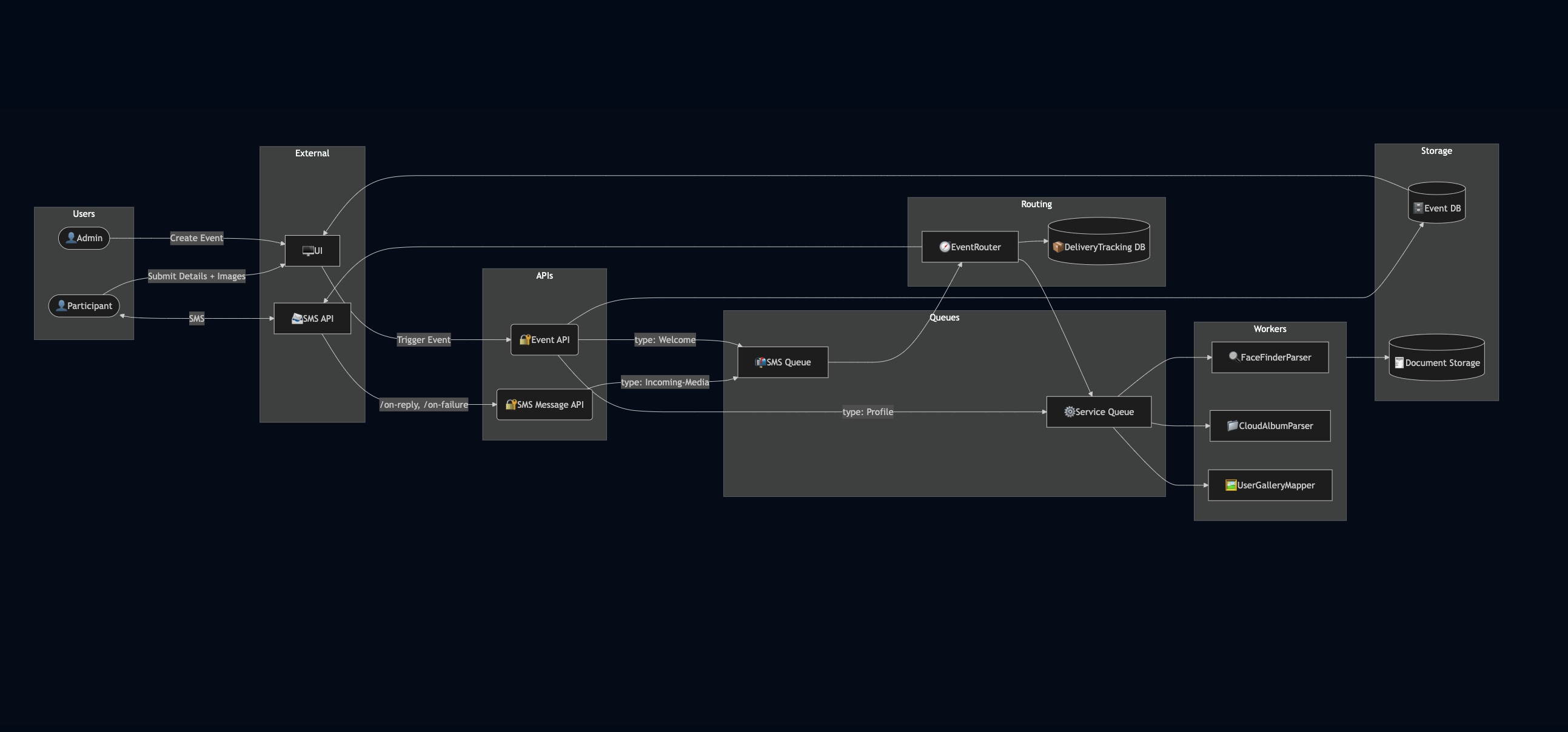
Components
Users:
The system serves two primary user roles: attendees and admins. Attendees are event attendees who upload profile photos, reply via SMS, and receive personalized photo galleries. Admins are event organizers who create and manage events through the web UI, triggering notification flows and monitoring event engagement.
External Systems:
The Gallery Viewer UI is a public-facing web interface where attendees upload their details and access their galleries. The SMS API serves as the communication layer between users and the system, handling inbound media, replies, and delivery status via webhooks.
API Layer:
The Event API is the main interaction point for both frontend and backend systems. It manages event creation, user registration, media uploads, and job queuing. The SMS Message API handles inbound communication from Twilio, parses incoming replies or media, and forwards structured events to the routing layer for further action.
Routing & Delivery:
At the center of the system is the EventRouter, which acts as a centralized decision engine. It evaluates incoming events and routes them to the appropriate queue whether for SMS dispatch or backend processing. The DeliveryTracking DB logs the success or failure of outbound messages, enabling monitoring, retries, and reporting for delivery health.
Queues:
The system uses two types of queues to decouple and scale workloads: the SMS Queue for all outbound communication tasks (e.g., welcome texts, gallery links), and the Service Queue for processing-heavy jobs like facial recognition and gallery generation. These queues allow the system to scale each type of workload independently.
Workers:
Three dedicated workers handle asynchronous event processing. FaceFinderParser performs facial recognition and matching. CloudAlbumParser ingests external photo urls, for example an iCloud link and downloads the photos associated with the link. UserGalleryMapper assembles personalized galleries by associating recognized faces with user profiles and saving structured outputs.
Storage:
Persistent system data is stored in two main backends. The Event DB contains event metadata, user profiles, and gallery metadata, while the Document Storage (e.g., S3) holds raw media and processed images. These storage layers are designed to scale independently and support low-latency read access for user-facing queries.
Final Thoughts
Moving fast is core to MVP thinking. Speed matters but so does direction. Defining high-level system requirements early on creates the guardrails that guide smart design and development. This is especially true with AI-assisted development. Developers now embed requirements directly in their IDEs, giving AI models the context they need to generate more accurate and aligned code. Well-defined inputs aren’t overhead—they’re leverage. Dedicating 10% of a project timeline to outlining these fundamentals can pay off in clarity, alignment, and long-term scalability. I get that people want to build fast but do your self a service and take the time to outline requirements.
But here’s where I got it wrong: I did listen. I heard the pain loud and clear—“I never get the photos I’m in,” “Sharing is such a mess,” “I wish I had a way to find myself in the gallery.” What I didn’t test fast enough was whether that pain translated into something people would actively seek out or pay for.
Because not every pain is a need. Some are just moments of friction people tolerate. After I built the prototype, I found myself asking: Now what? Who really needs this, and how badly? That question hit me harder than expected. I came across The Mom Test while trying to learn how to communicate with potential customers, and it changed how I think about product validation forever. Forty percent of early-stage startups fail not because they can't build, but because they build something no one needs.
So now I see MVP differently. Every letter in that acronym matters but “Viable” is the one to double down on. Viability isn’t something you confirm post-launch; it’s something you pressure-test early.
And how do you test it? By listening not just for pain, but for intent, urgency, and behavior.
Because listening isn’t just how you start, it’s how you learn what actually matters.